
Blog
Google Ads Setup Guide for Beginners: Powerful 7-Step Success Blueprint for Fast Growth


Google Ads Setup Guide for Beginners

Google Ads Setup Guide for Beginners is designed for business owners, marketers, and entrepreneurs who want to generate leads, sales, and website traffic through Google Ads. As one of the most powerful digital advertising platforms, Google Ads allows businesses to reach potential customers exactly when they are searching for products or services online. However, creating a successful campaign requires more than simply launching ads. Proper account setup, strategic keyword research, campaign structuring, budget management, and conversion tracking are essential for achieving the best return on investment (ROI). In this comprehensive guide, you will learn how to set up Google Ads correctly and avoid common beginner mistakes. For more digital marketing insights, visit Grobit.
Table of Contents
1. What Is Google Ads and How Does It Work?
2. Creating Your Google Ads Account
3. Keyword Research for Successful Campaigns
4. How to Set Up Your First Campaign
5. Budget and Bidding Strategy
6. Setting Up Conversion Tracking
7. Campaign Optimization Best Practices
8. Conclusion
What Is Google Ads and How Does It Work?
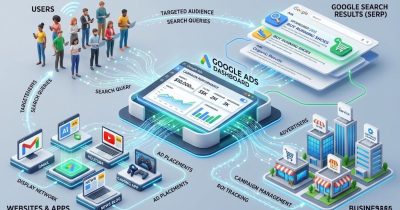
Google Ads is Google’s online advertising platform that allows businesses to display advertisements across Google Search, YouTube, Gmail, Google Maps, and millions of partner websites. Advertisers bid on keywords related to their products or services, and ads appear when users search for those terms. The platform operates primarily on a pay-per-click (PPC) model, meaning advertisers only pay when someone clicks on their ad. This makes Google Ads one of the most measurable and cost-effective digital marketing channels available today.
Benefits of Google Ads
Reach customers actively searching for your services
Generate high-quality leads and sales
Control your advertising budget
Measure campaign performance accurately
Increase brand visibility quickly
Target specific locations, devices, and audiences
Google Ads is suitable for businesses of all sizes, from local startups to global enterprises.
External Resource:
Google Ads Help Center
Creating Your Google Ads Account
The first step in this Google Ads Setup Guide for Beginners is creating a Google Ads account. A properly configured account provides the foundation for successful advertising campaigns. Start by signing in with your Google account and selecting your primary business goal. Whether your objective is lead generation, website traffic, or online sales, choosing the right goal helps Google optimize campaign performance.
Account Setup Checklist
Create or log in to a Google account
Sign up for Google Ads
Add billing information
Define business objectives
Set geographic targeting preferences
Configure account-level settings
Enable conversion tracking preparation
Taking time to configure these settings correctly will make campaign management significantly easier in the future.
Google Ads Setup Guide for Beginners – Keyword Research Essentials

Keyword research is the backbone of every successful Google Ads campaign. Choosing the right keywords ensures your ads appear in front of users who are actively searching for your products or services.
Beginners often make the mistake of targeting broad keywords that generate clicks but fail to convert. Instead, focus on keywords with strong commercial intent and relevance to your offerings.
Best Keyword Research Practices
Identify high-intent search terms
Use long-tail keywords for better targeting
Analyze competitor keywords
Include negative keywords
Review search volume and competition levels
Focus on keywords with purchase intent
Examples of High-Intent Keywords
Google Ads management services
Digital marketing agency near me
PPC advertising company
Google Ads consultant
Using long-tail keywords often results in lower costs and higher conversion rates.
External Resource:
Google Keyword Planner
How to Set Up Your First Google Ads Campaign
Once keyword research is complete, the next step in this Google Ads Setup Guide for Beginners is campaign creation. For beginners, Search Campaigns are usually the best starting point because they target users who are already searching for specific solutions.
Campaign Setup Process
Create a new campaign
Select your campaign objective
Choose Search Network
Define geographic targeting
Set language preferences
Create ad groups
Add keywords
Write ad copy
Launch the campaign
Ad Copy Best Practices
Include your primary keyword
Write compelling headlines
Highlight benefits and unique selling points
Add a clear call-to-action
Match ad messaging with landing pages
A well-structured campaign improves Quality Score and helps reduce advertising costs.
Budget and Bidding Strategy for Beginners
Budget management is one of the most important skills for new advertisers. Many beginners spend too much too quickly without collecting enough data to make informed decisions. Start with a manageable daily budget and gradually scale your campaigns based on performance.
Popular Bidding Strategies
Maximize Clicks
Maximize Conversions
Manual CPC
Target CPA
Target ROAS
Budget Management Tips
Begin with a test budget
Monitor spending daily
Pause underperforming keywords
Increase investment in profitable campaigns
Review performance reports regularly
For most beginners, Maximize Clicks can be a useful starting strategy while gathering initial campaign data.
Setting Up Conversion Tracking
Conversion tracking is a critical part of any Google Ads Setup Guide for Beginners. Without tracking, it becomes impossible to determine which campaigns, ads, or keywords are generating actual business results. Conversion tracking allows advertisers to measure meaningful actions taken by users after clicking an ad.
Important Conversions to Track
Contact form submissions
Phone calls
Online purchases
Newsletter signups
Appointment bookings
WhatsApp inquiries
Steps to Configure Conversion Tracking
Install Google Tag Manager
Create conversion actions in Google Ads
Add tracking tags to your website
Verify tracking accuracy
Test conversion events
Accurate conversion data helps improve bidding decisions and overall campaign performance.
External Resource:
Google Tag Manager Documentation
Campaign Optimization Best Practices
Launching a campaign is only the beginning. Continuous optimization is essential for maximizing performance and improving return on investment. Regular analysis helps identify opportunities to reduce costs and increase conversions.
Optimization Checklist
Review search term reports
Add negative keywords
Improve ad copy performance
Test multiple ad variations
Adjust bids based on results
Optimize landing pages
Monitor conversion data
Key Metrics to Monitor
Click-Through Rate (CTR)
Cost Per Click (CPC)
Conversion Rate
Cost Per Acquisition (CPA)
Return on Ad Spend (ROAS)
Quality Score
Consistent optimization can significantly improve campaign profitability over time.
Conclusion
This Google Ads Setup Guide for Beginners provides a complete roadmap for launching and managing successful advertising campaigns. By focusing on proper account setup, keyword research, campaign structure, budget management, conversion tracking, and ongoing optimization, businesses can generate high-quality leads and maximize their advertising investment. Success with Google Ads comes from continuous learning, testing, and improvement. Start with a small budget, monitor performance closely, and scale campaigns that consistently deliver results. With the right strategy and execution, Google Ads can become one of the most effective growth channels for your business.
Follow for more updates on our social platforms:
Stay connected with us on:
Don’t miss out on the latest updates, insights, and content!